Four types of reports can be used to display data in reFlector:-Charts
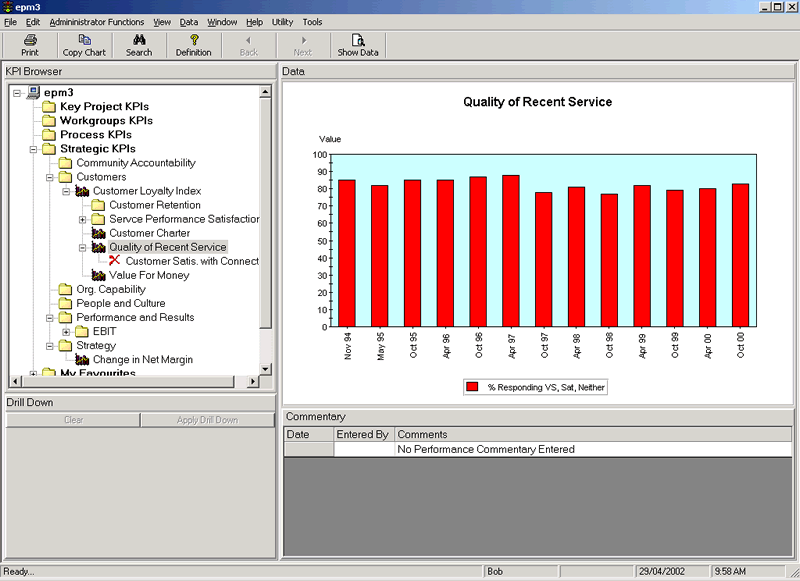
The chart display is recommended for most data
(refer figure 1), with numerous styles of charts available e.g. Line, Run, Bar and Stacked Bar and combinations. Display targets, multiple series, comments and traffic lighting .
reFlector
can also advise users when there has been a change in performance of a KPI by using inbuilt statistical rules.
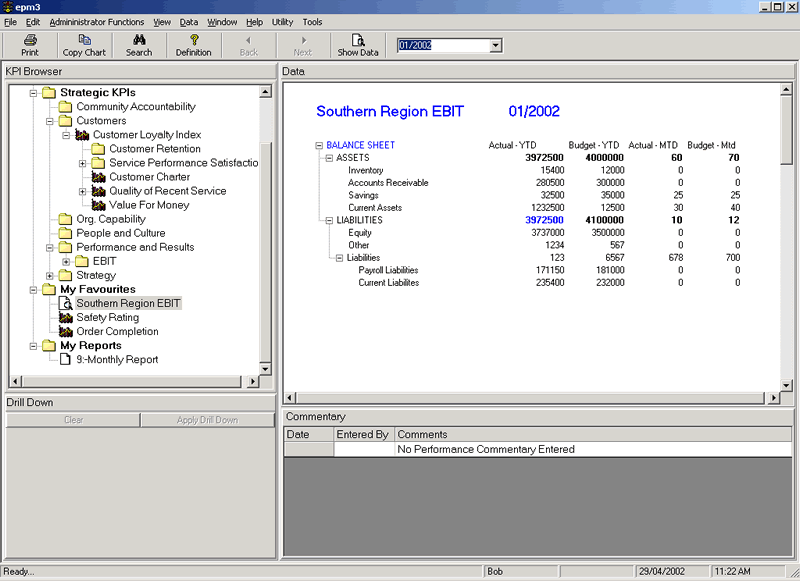
Tabular Reports
Tabular reports (figure 2) permit the reporting
of data in a tabular format - typically financial data such as Balance Sheets, or Scorecards. A drop down box allows the user to select data for particular periods. Tabular reports can be
designed to suit any scenarios. Reports can also be designed to show / hide extra detail.
Real-Time Reports
With real-time reports you can query your corporate databases - eg to display a
list of orders that have missed a target, or projects running over budget, staff with excessive recreation leave etc. The real-time report designer allows you to report on whatever you want - and
makes the information available to those who need it.
File Data Sources
With this option you can open files on your network. eg to display process documentation, business plans,
spreadsheets or other documents.